Setting up GIS coordinates
IEE can plot service locations on the map if the GIS coordinates have been configured. Configuring GIS coordinates is done at the service-point level, not the meter level.
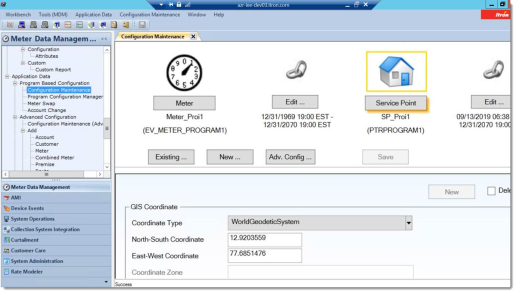
-
Navigate to Meter Data Management > Application Data > Configuration Maintenance.
-
In the GIS Coordinate panel:
-
Enter latitude in the North-South Coordinate field.
-
Enter longitude in the East-West Coordinate field.
-
Select a Coordinate Type from the dropdown menu.
Note: IEE only supports displaying a location on a map if the service point's coordinates are configured as WorldGeoditicSystem (WGS). UTM and StatePlane are not supported. If the service point is configured using UTM or StatePlane coordinate types, IEE does not automatically convert these coordinates to WGS, so IEE is unable to plot the location on a map.
The other field, Coordinate Zone, is not used by CSR UI at this time and does not have to be filled in.
-